


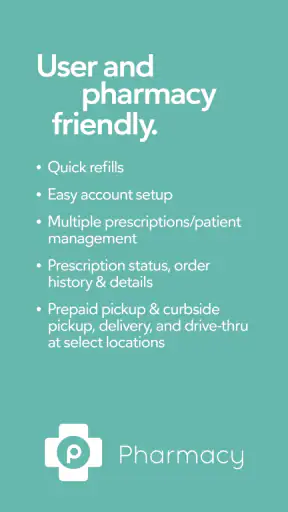
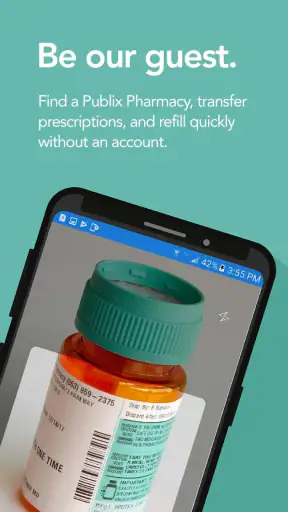
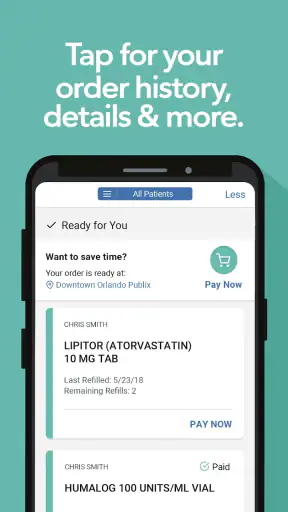
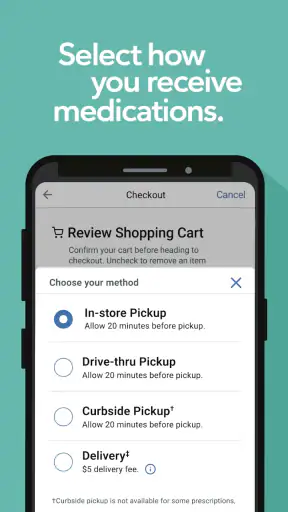
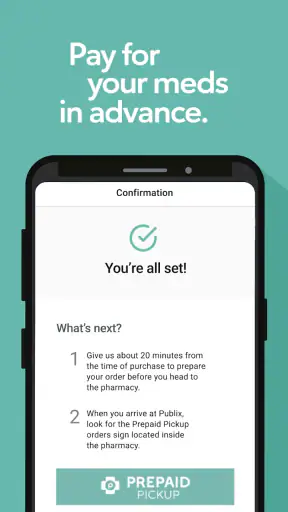
Managing prescriptions is one of those jobs that feels simple until several refills, family members, and pickup plans start colliding. I found Publix Pharmacy most useful when I treated it as a practical companion to the pharmacy counter rather than as a complete medical-management system. It gives me a way to handle prescription-related tasks from my phone, which is especially convenient when I am away from home or trying to avoid an unnecessary call.
Published by Publix Super Markets Inc., this free medical app is aimed at people who already use Publix Pharmacy and want a more convenient digital routine. It has reached over a million installs and holds a 4.8 average from around eleven thousand ratings, so it clearly appeals to a substantial group of regular pharmacy customers. My experience was positive overall, but the value depends heavily on whether Publix is already the pharmacy I use.
How I use Publix Pharmacy in a normal week
The most sensible starting point is to build a dependable baseline workflow. I open the app when I need to check on a prescription, arrange the next step in the refill process, or keep pharmacy tasks from getting lost among messages and paper receipts. That is more useful than opening it casually and expecting it to replace every health app on my phone.
For a routine prescription, I prefer to deal with it before I am nearly out. That gives me time to review what is available in the app, make sure I am working with the correct pharmacy information, and resolve any issue without turning an urgent medication need into a rushed errand. The app is most helpful here as a preparation tool: it lets me begin the process before I am standing in line or trying to remember prescription details at the counter.
A realistic example is a weekday when I notice that a regular medicine is getting low while I am at work. Instead of waiting until the evening, I can use the Publix Pharmacy app to manage the prescription from my phone, then plan a pharmacy visit around my other errands. That small change is the main convenience. It turns a task that usually requires a separate phone call into something I can start when I notice it.
I also like keeping the app focused on pharmacy work. It is tempting to expect a medical app to organize symptoms, appointments, medication reminders, insurance documents, and clinical advice all in one place. That is not how I would judge this product. Its strongest role is prescription access connected to Publix, not broad personal health administration.
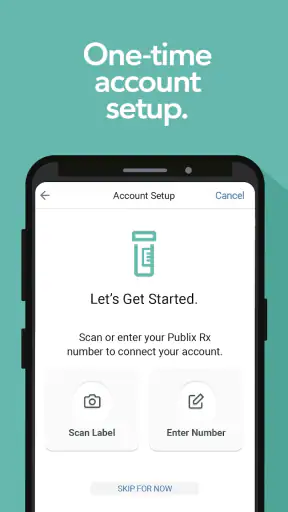
The first setup deserves a little patience. I would check that the selected pharmacy is the branch I actually use and that the prescription information shown belongs to me. If several people in a household use the same store, I would be especially careful before submitting a request. A fast tap is not helpful if it sends the task toward the wrong location or the wrong prescription.
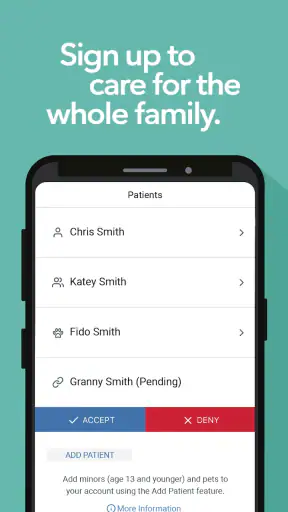
That household point is important because a pharmacy app can feel very efficient for one person and confusing for a family. I would not assume that one login automatically makes every family member’s medication list available or that a relative’s prescription can be handled without the appropriate account access. For children, older relatives, or anyone receiving help, I would confirm how the app represents those prescriptions before relying on it as the only way to manage them.
Publix Pharmacy is also a better fit for repeatable routines than for emergencies. If I suddenly need urgent medical advice, a new diagnosis, or help deciding whether a symptom is serious, I would use a qualified healthcare service instead. The app can support the pharmacy part of a medication routine, but it should not be treated as a substitute for a pharmacist, doctor, or emergency service.
Settings I check before relying on it
I do not think of settings as decoration in a prescription app. They determine whether the app saves time or creates another place to check. After installing it, I would review account details, pharmacy selection, and any communication or notification choices that are available on the device and within the app. The goal is not to enable everything blindly; it is to make sure useful updates are not missed while avoiding unnecessary interruptions.
My preferred approach is selective attention. Pharmacy-related alerts can matter, but a phone that produces constant notifications encourages me to dismiss all of them. I would allow the alerts that help me notice a change in a prescription task and leave unrelated phone notifications under control. If an update seems unclear, I would open the prescription screen directly instead of acting from a notification alone.
I would also check the phone’s privacy and lock settings before using the app in public. Prescription information is personal, and the risk is not only someone opening the app. Notification previews can reveal more than expected on a lock screen. A cautious setup keeps sensitive text out of previews where possible and uses the device’s normal security protection.
Another useful habit is checking the app after an operating-system update. The current version is 3.1.16, and it supports devices running Android 8.0 or later. That makes it accessible to many older Android phones, but compatibility alone does not guarantee that every older device will feel equally smooth. If the app behaves strangely after a system change, I would first close and reopen it, confirm the connection, and then check whether the phone itself needs attention.
The age rating is Everyone, which makes the app broadly suitable from a store-rating perspective. That should not be confused with independent medical suitability for every situation. A child may be able to use a phone app, but prescription decisions still belong with the responsible adult and healthcare professionals involved.
I would not spend time hunting for elaborate customization. The practical settings are the ones that protect accuracy: the right account, the right pharmacy, readable prescription information, and sensible alerts. That is a more valuable setup than trying to turn the app into a full medication dashboard when its purpose is narrower.
Faster patterns that make repeat tasks easier
Experienced use comes from repeating the same sequence rather than searching randomly each time. I open the app with a specific task in mind, verify the prescription and pharmacy context, complete the available action, and then make a note of what still needs to happen outside the app. This prevents the common mistake of assuming that starting a request means the entire pharmacy process is finished.
For recurring prescriptions, I would create a personal reminder based on my supply and routine rather than waiting for a last-minute prompt. The reminder does not need to be complicated. A calendar entry or a recurring phone alert can simply tell me to open Publix Pharmacy and review the next refill. The app handles the pharmacy interaction; my phone’s normal tools handle the habit.
This separation is one of my favorite practical workarounds. A pharmacy app does not need to provide every reminder feature if I already have a calendar, alarm, or task list that I trust. I use Publix Pharmacy for the prescription action and the operating system for the reminder. That keeps the workflow simple and avoids duplicating the same schedule in several places.
I would also avoid submitting the same request repeatedly just because the screen does not change immediately. Slow connections, account refreshes, or a momentary delay can make a user wonder whether a tap worked. Before trying again, I would revisit the relevant prescription area and check for an updated status. Duplicate attempts are an avoidable source of confusion, especially when I am multitasking.
When I am preparing for a store visit, I use the app before leaving rather than in the parking lot. That gives me time to read carefully, correct an account or pharmacy selection if necessary, and call the store if something needs human clarification. The best shortcut is often simply moving the task earlier in the day.
For people who regularly collect several prescriptions, I would keep a short private note with the names or purposes of medicines and the preferred pickup routine. I would not use that note as a medical record, but it can reduce mistakes when several similar-looking tasks appear in the app. The app is more efficient when I already know what I am trying to accomplish.
Another repeatable pattern is using the app as a check before contacting the pharmacy, not as a barrier to contacting it. If the screen answers my question, I save a call. If it leaves an important detail unclear, I stop and ask the pharmacy directly. That balance is faster than forcing every situation through the app.
Where the convenience reaches its limits
The biggest limitation is its connection to Publix Pharmacy. If I use another pharmacy, the app does not become a general prescription manager simply because it is installed on my phone. In that situation, the pharmacy’s own application or a broader medication tool may be more useful. I would choose this app because of the Publix relationship, not because I expect it to coordinate every pharmacy account.
It is also not the right tool for someone who wants detailed clinical guidance. I would not rely on it to explain a new side effect, compare treatments, interpret lab results, or decide whether to change a dose. Those questions need a pharmacist or clinician who can consider the complete medical context. A clean digital workflow cannot replace professional judgment.
There is a practical human-factor limitation too: phones are not always the easiest place to manage medication information. Someone with poor eyesight, limited dexterity, an older device, or discomfort with account-based apps may find a phone call or in-person conversation easier. The app should reduce friction, not become an obligation for people who are better served by direct assistance.
Internet access and account access are also part of the experience. If I am traveling, using a weak connection, or unable to sign in, I would not wait until the last possible moment to handle an important refill. This is why I prefer the early-reminder workflow. Digital convenience works best when there is enough time to switch to a phone call or store visit if needed.
Privacy is another trade-off. A digital prescription tool is convenient because information is available in one place, but that also means I need to protect my phone and account. I would be cautious about using a shared device, leaving the app open, or discussing prescription details through visible notification text. These are ordinary precautions, but they matter more for medical information than for a shopping list.
The app’s free price is a clear advantage for someone already using Publix Pharmacy, since there is no purchase decision standing between the user and the basic download. Still, free does not mean universally useful. A person who rarely uses Publix, prefers speaking with pharmacy staff, or needs a complete medication-management system may gain little from installing it.
Its broad Everyone rating also does not remove the need for supervision in a family setting. I would not hand over prescription decisions to a child simply because the app is easy to download. The account holder and responsible adults still need to control what is requested and verify that the information is correct.
Compared with a pharmacy phone call, the app is quieter and more convenient for straightforward tasks, but a call is better when the situation is unusual or time-sensitive. Compared with a general medication reminder, Publix Pharmacy is more directly tied to the pharmacy workflow, while a reminder app may be better for doses, schedules, and medicines from several providers. Compared with visiting the store, the app saves a trip only when the digital process gives me enough information to act confidently.
Who will get the most from it
I would recommend Publix Pharmacy to regular Publix customers who manage ongoing prescriptions and want a repeatable way to begin pharmacy tasks from a phone. It is especially useful for people who often remember refills while commuting, working, or handling family errands. The free access and broad device support make it an easy option to try if Publix is already part of the routine.
I would be more cautious recommending it to someone who uses several unrelated pharmacies. In that case, maintaining separate pharmacy apps may create more work than it removes. A single medication organizer could offer a clearer overview, while each pharmacy’s own service would still be used only when an order or refill actually needs attention.
I also would not make it the sole system for an older family member without testing the workflow together. The best arrangement may be for a caregiver to help with account setup and use the app alongside direct pharmacy communication. That combines the convenience of digital access with the reassurance of a person checking important details.
For a busy parent, the app can be useful when paired with a calendar routine: schedule a reminder, open the pharmacy app early, review the prescription, and leave enough time for questions. For a person with a complex treatment plan, however, I would pair it with a separate medication list and professional guidance. The pharmacy app handles one part of the process well; it should not be asked to carry the entire burden.
My verdict after building a routine around it
Publix Pharmacy is a focused medical app that earns its place through convenience rather than breadth. I like it most when I use it deliberately: check the right prescription, confirm the pharmacy context, start the task early, and keep clinical questions with a pharmacist or doctor. That approach makes the app feel dependable without expecting it to do work it was not designed to do.
The developer, Publix Super Markets Inc., has created something that suits regular customers who want prescription management available anytime and anywhere. The strong 4.8 average and more than a million installs suggest that this focused approach works for many people, although popularity does not remove the need to judge whether Publix is the right pharmacy for my own routine.
My final recommendation is straightforward: install it if Publix Pharmacy already handles your prescriptions and you want fewer routine calls or unnecessary trips. Set it up carefully, use phone reminders to start refill tasks early, and treat the app as one part of medication management rather than a medical adviser. If your needs center on multiple pharmacies, dose tracking, clinical information, or personal assistance, another tool—or a direct conversation with pharmacy staff—may serve you better.
The best result comes from combining the app’s pharmacy access with your own careful habits. Used that way, it is a practical time-saver, not a flashy all-purpose health platform, and that honest limitation is also what makes its everyday purpose clear.


